Device Reconciliation — Intune vs CMDB
Reconciles the Intune device inventory against the ServiceNow CMDB by hostname and asset tag, from a single-device lookup up to a fleet-wide discrepancy triage.
Rebuilt on synthetic data — figures illustrative
Overview
The Intune inventory and the ServiceNow CMDB were two separate systems of record for the same fleet, and they drifted apart quietly — a laptop reimaged in Intune wouldn't always get its ServiceNow record updated, and a CMDB entry retired in ServiceNow wouldn't always mean Intune stopped managing the device. Finding the gap meant exporting both systems and comparing them by hand, one attribute at a time.
Objective
Give reconciliation two speeds: a quick single-device lookup to confirm one machine before touching a ticket, and a fleet-wide triage view to see where the two systems disagree most, so the field with the most impact gets fixed first.
Approach
PowerShell pulls the device inventory from Microsoft Graph and the CMDB export from ServiceNow on a schedule, both keyed on hostname and asset tag. Power Query joins the two sources on that key and computes a per-attribute status — match, mismatch, present in one system only, or blank in one system — across the fields that matter for reconciliation: asset tag, asset type, compliance, install status, location, manufacturer, model, model category, OS, OS version and ownership. The device-level table stays at that grain so any single machine can be inspected field by field; a second, attribute-level rollup counts discrepancies per field and per region for the fleet view.
Solution
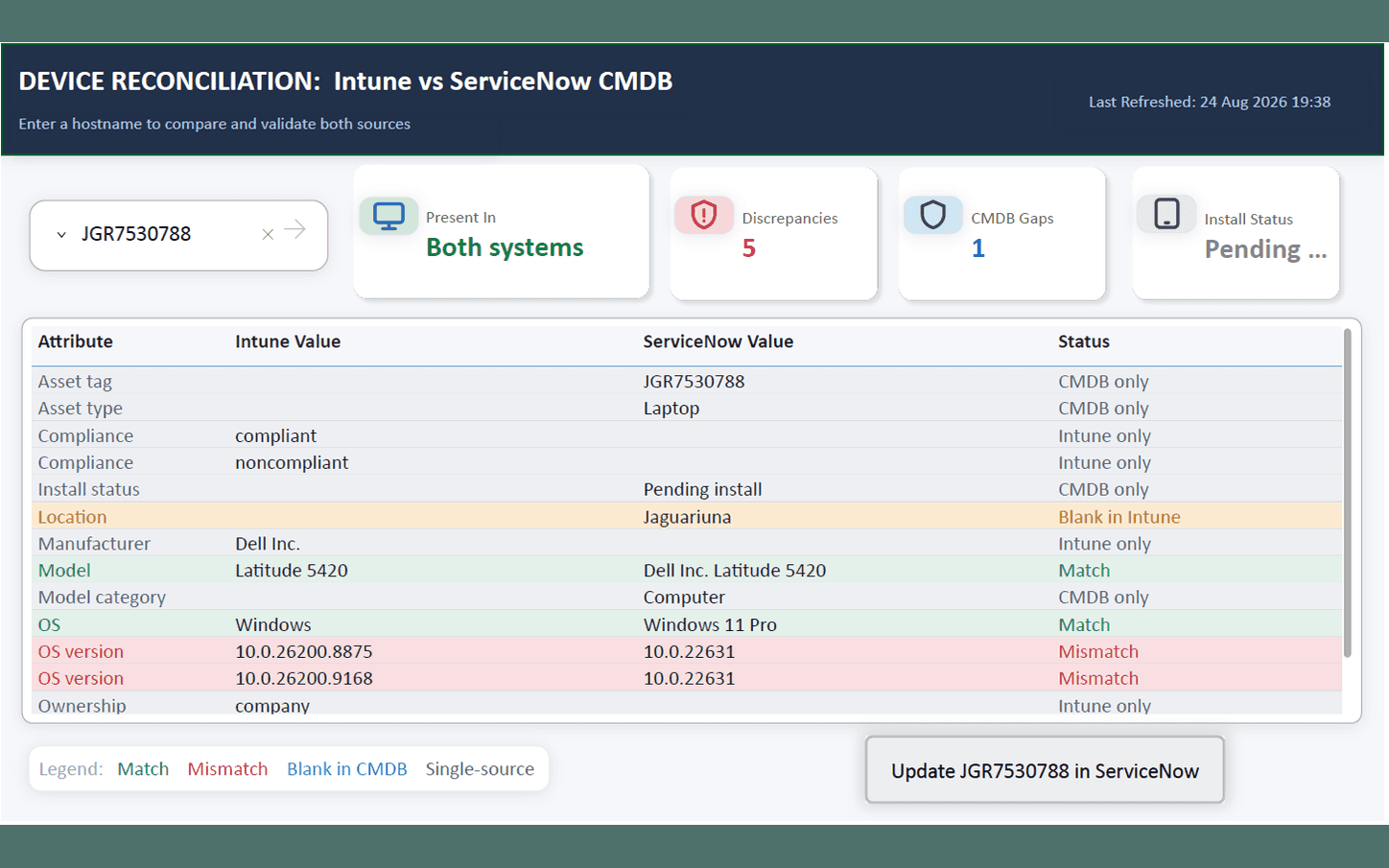
The Device Reconciliation page is a single-device lookup: enter a hostname or asset tag, and four KPI cards summarise it — which systems it's present in, how many discrepancies it has, whether it has a CMDB gap, and its install status — above a colour-coded table of every compared attribute, Intune's value against ServiceNow's, flagged match, mismatch, or single-source. An "Update in ServiceNow" action sits next to the result, so reconciling a device doesn't mean leaving the report.
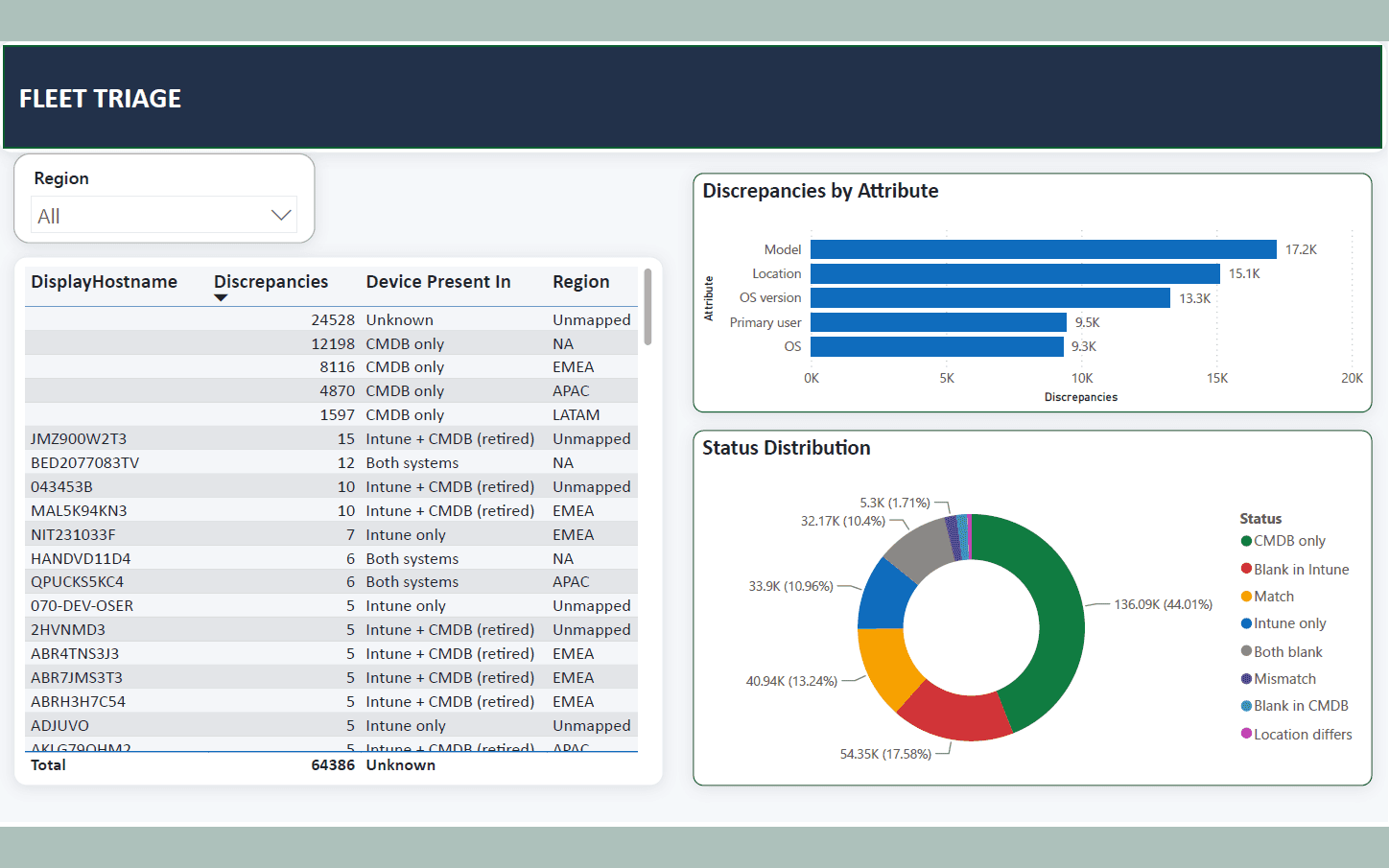
The Fleet Triage page turns the same comparison outward: a region filter and a hostname table sorted by discrepancy count surface the worst offenders first, a bar chart ranks which attributes disagree most often, and a status-distribution donut shows how every compared field splits across CMDB-only, Intune-only, blank, matched and mismatched.
Every figure shown is synthetic. In this build, model, location and OS version account for the bulk of the roughly 64K discrepancies, and matched attributes sit at about 13% of all comparisons — illustrative only, not a real fleet's numbers.
Technology
- Power BI
- Power Query
- Microsoft Graph
- ServiceNow
- PowerShell
Outcome
The join, the per-attribute status logic, and both report pages work end to end against the synthetic Intune and CMDB exports shown here. Swap those for real exports from the two systems and the same model surfaces the same reconciliation — this is the shape a real gap-closing exercise would take, not a mockup of one.